Fix 'PORT' is not recognized as an internal or external command
A package.json script such as "dev": "PORT=3001 next dev" works on macOS and Linux, then stops on Windows with "'PORT' is not recognized as an internal or external command, operable program or batch file." NODE_ENV=production fails the same way, with "'NODE_ENV' is not recognized as an internal or external command". The script isn't wrong. Windows runs it with a different shell.
Why it fails on Windows
On Windows, npm runs package.json scripts with Command Prompt (cmd.exe), even when you type npm run dev in PowerShell or Git Bash. pnpm does the same by default. Writing NAME=value in front of a command is how sh and bash set a variable for that one command. Command Prompt has no such syntax, so it tries to run PORT as a program and stops.
The line is common in READMEs and framework docs. Next.js, for example, shows PORT=4000 next dev for changing the dev server's port. Pick a fix below: use the tool's own port flag, set the variable in your terminal before you run the script, change the script so it works for the whole team, or have your package manager run scripts with a bash-like shell.
If it only sets the port, use the flag
Next.js and Vite take the port as a flag, which works in every shell with nothing to install. A plain Node server usually reads PORT and has no flag, so use one of the fixes below. Vite doesn't read PORT at all: in our test with Vite 8, setting PORT to 4000 left it on port 5173, while --port 3001 moved it.
# Next.js, in package.json
"dev": "next dev -p 3001"

# Vite, in package.json
"dev": "vite --port 3001"
Set it in PowerShell for this window
Keep the script plain, such as "dev": "next dev", and set the variable first. Setting $env:PORT changes it for this PowerShell window and every program you start from it, in any project, until you close the window or run the last line below.
$env:PORT = 3001
npm run dev

# Back to normal in this window
Remove-Item Env:PORT
Set it in Command Prompt, without the trailing space
These lines work only in Command Prompt. In PowerShell, set is short for Set-Variable, so they don't set PORT for npm: use the PowerShell section above instead.
Put set before the command, and watch the space before &&: set PORT=3001 && npm run dev stores "3001 " with a space on the end. Put quotes around the whole assignment, or leave no space before &&.
In our test with npm 11 and Node 24, both lines below set PORT to exactly 3001. With the space, Node still listened on port 3001, but the same mistake with NODE_ENV made process.env.NODE_ENV === 'production' false.
set "PORT=3001" && npm run dev

set PORT=3001&& npm run dev
Fix the script for everyone with cross-env
If the whole team runs the script, fix it in package.json instead. cross-env sets variables the same way on Windows, macOS and Linux. Install it with the first line, then change the scripts in package.json. Version 10 needs Node 20 or later.
npm install --save-dev cross-env

# Then in package.json
"scripts": {
  "dev": "cross-env PORT=3001 next dev",
  "start": "cross-env NODE_ENV=production node server.js"
}
Or run scripts with a bash-like shell
pnpm has a cross-platform shell built in. Add shellEmulator: true to pnpm-workspace.yaml, and PORT=3001 next dev works on Windows unchanged. If the project has no pnpm-workspace.yaml, create one next to package.json with just this line. In our test, pnpm 10 and 11 both read it there, while shell-emulator=true in .npmrc worked only in pnpm 10.
npm can run scripts with Git Bash instead of Command Prompt. The setting goes in your user .npmrc, so it covers every project you run with npm under your Windows account, and scripts written for Command Prompt, such as ones using set or copy, stop working. It needs Git for Windows. If Git isn't in C:\Program Files\Git, change the path to its bin\bash.exe. The last line undoes it.
# pnpm: add this line to pnpm-workspace.yaml
shellEmulator: true

# npm: run scripts with Git Bash, for every project under your Windows account
npm config set script-shell "C:\Program Files\Git\bin\bash.exe"

# Undo the npm setting
npm config delete script-shell
Why PORT in .env doesn't change the port
Putting PORT=3001 in .env doesn't move a Next.js dev server. The Next.js docs say PORT can't be set in .env, because the server starts before any other code runs. Other values in .env still load.
For your own Node server, node --env-file=.env server.js loads .env before your code starts, PORT included, with no package needed. It works in Node 20.6 and later. Node 20, Node 22 before 22.21 and Node 24 before 24.10 print an experimental warning. A variable already set in your terminal wins over the file, so remove a leftover $env:PORT first. In our test with Node 24 it set both PORT and NODE_ENV.
Keep variables with the dev server in RepoYard
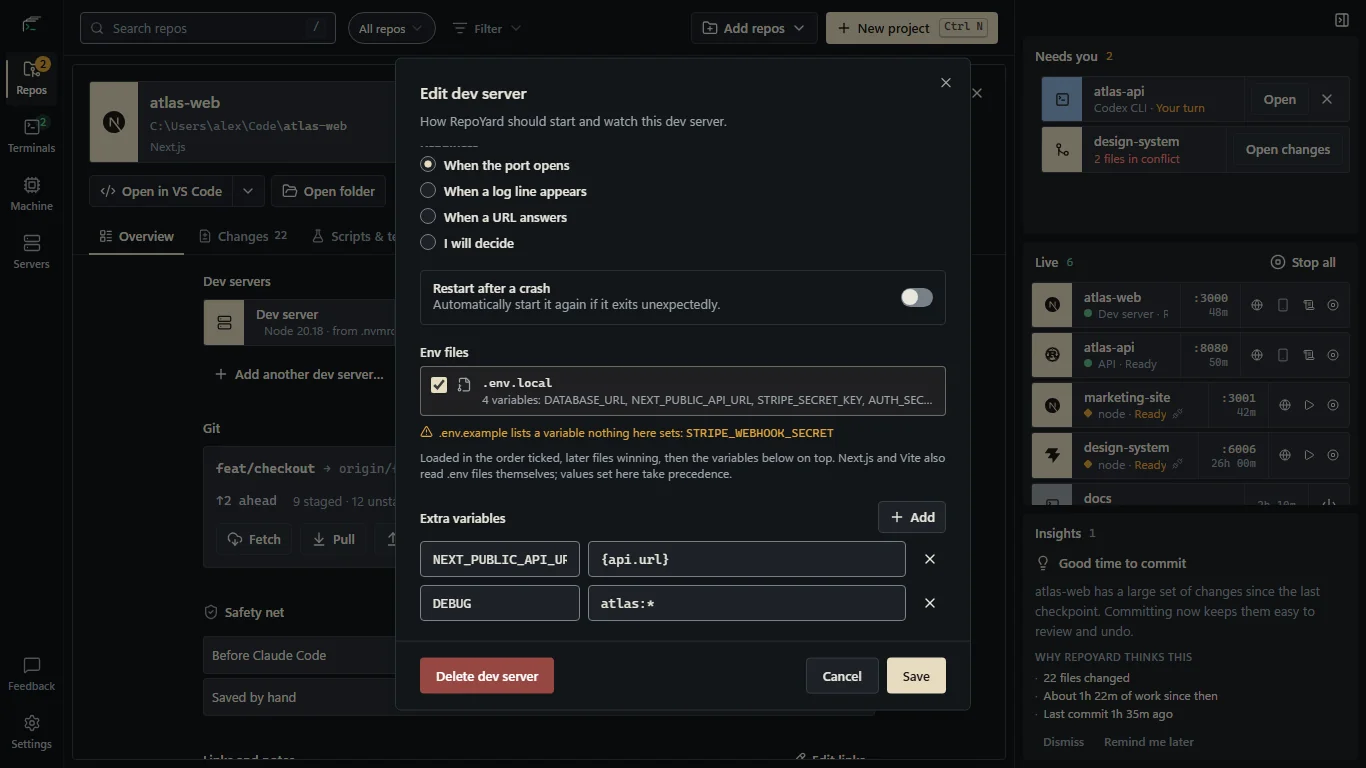
In RepoYard, a dev server's variables live in its settings rather than in the script. Open a repo, click the pencil (Edit) button next to the dev server and add them under Extra variables. They are set every time it starts, on top of any env files you tick, and take priority over the .env files Next.js and Vite read themselves.
You don't need to set PORT at all. RepoYard uses the dev server's preferred port when it is free and otherwise picks a free one, then passes it in PORT to Next.js, Node servers, NestJS and Bun, and as --port to Vite. In a stack (dev servers RepoYard starts together, for example an API and a web app), a value such as {api.url} becomes the API's address, like http://localhost:8080, when the stack starts.
RepoYard starts a dev server with npm run dev or your package manager's equivalent, so a script that still begins with PORT=3001 fails there too, unless you turned on one of the shell settings above. Remove the variable from the script and set it on the dev server instead.
Further reading
Try the workflow in RepoYard.
Windows 10 and 11, x64. Every feature for 7 days, then US$39.99 once. No RepoYard account needed.