Free up disk space from node_modules and build caches on Windows
Every JavaScript or Rust project keeps its own installed packages and build output. Across a code folder full of repos, that adds up to gigabytes you only need for the projects you are working on now.
Know what each folder costs to get back
Build caches such as .next, .nuxt, .svelte-kit, .turbo, .parcel-cache, .angular/cache, node_modules/.vite and node_modules/.cache are recreated by their tools. Deleting one makes the next start slower, and it often fixes a stale build.
node_modules holds installed packages and comes back when you run install. A Rust target folder holds build output, and the next build after deleting it starts from scratch.
Find the biggest folders
Run this in PowerShell from your code folder. It lists the node_modules folder at the top of each repo, largest first. Replace node_modules with .next or target to check other folders. On a large folder it can take a minute.
With pnpm, packages are usually hard links to a shared store on the same drive, so deleting node_modules frees less space than this shows. pnpm store prune removes packages that no project uses any more.
Get-ChildItem -Directory | ForEach-Object {
  $folder = Join-Path $_.FullName "node_modules"
  if (Test-Path $folder) {
    $bytes = (Get-ChildItem $folder -Recurse -File -Force -ErrorAction SilentlyContinue | Measure-Object Length -Sum).Sum
    [pscustomobject]@{ Repo = $_.Name; GB = [math]::Round($bytes / 1GB, 2) }
  }
} | Sort-Object GB -Descending
Delete them safely
First stop the project's dev server, test watcher and anything else with files open in the folder. Windows will not delete an open file, and a delete that stops partway leaves a broken node_modules behind.
Then delete the folder from the repo and reinstall. For a build cache, use its folder name and skip the install. In our test with Windows PowerShell 5.1 on Windows 11, Remove-Item removed a workspace link inside node_modules without touching the package it pointed to.
Remove-Item node_modules -Recurse -Force
npm install
Clear build caches across every repo in RepoYard
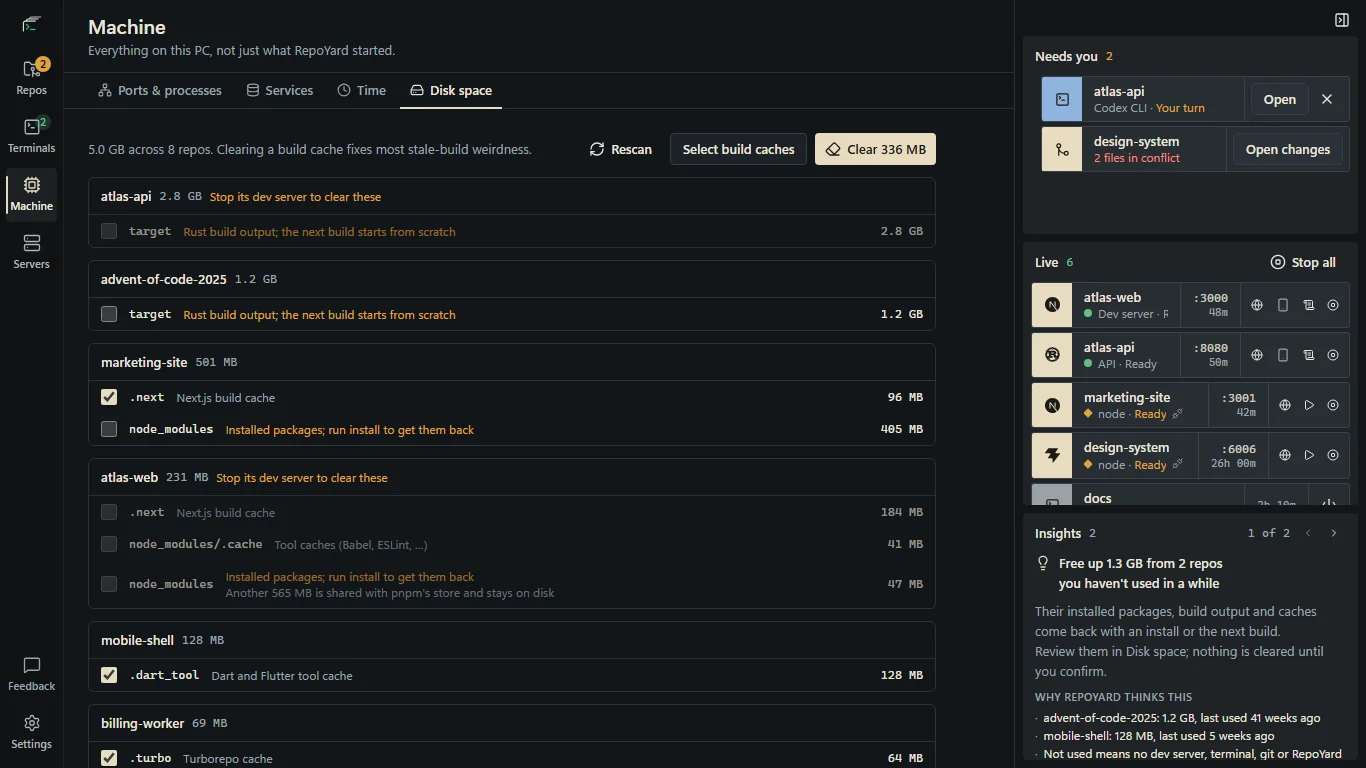
Open Machine, then Disk space. RepoYard lists the build caches, installed packages and Rust build output in each repo and in each package of a monorepo, such as apps/web/.next, largest repo first. Sizes are what clearing frees. In a pnpm node_modules most files are shared with pnpm's store and stay on disk, so the row shows that part separately.
Select build caches ticks every build cache in repos with no dev server running. It never ticks installed packages or build output, so one click clears only what tools rebuild on their own. You can tick node_modules or target yourself, and the confirmation reminds you to install or build again.
RepoYard deletes only folders on its list, only inside the repo or one of its packages, and not while that repo's dev server or tests are running. node_modules counts only beside a package.json, and target only beside a Cargo.toml. Each folder is renamed before it is deleted, so a folder still in use fails cleanly instead of being left half deleted.
Insights also points out repos you have not used for four weeks and how much space they hold, from the last Disk space scan. Nothing is cleared until you confirm it in Disk space.
Further reading
Try the workflow in RepoYard.
Windows 10 and 11, x64. Every feature for 7 days, then US$39.99 once. No RepoYard account needed.