Undo changes from a coding-agent session
A coding agent can edit several files before you realize the result is not what you wanted. A checkpoint taken before the session gives you a known state to return to, including work you had not committed yet.
Review before restoring
Stop or pause the coding session before reviewing its changes. Read the file diffs and decide whether you want to keep part of the result. Copy anything you want to retain before restoring an earlier working tree.
A working-tree restore changes files on disk. It is different from asking the agent to reverse its own edits, which can introduce another set of changes.
Return to a RepoYard checkpoint
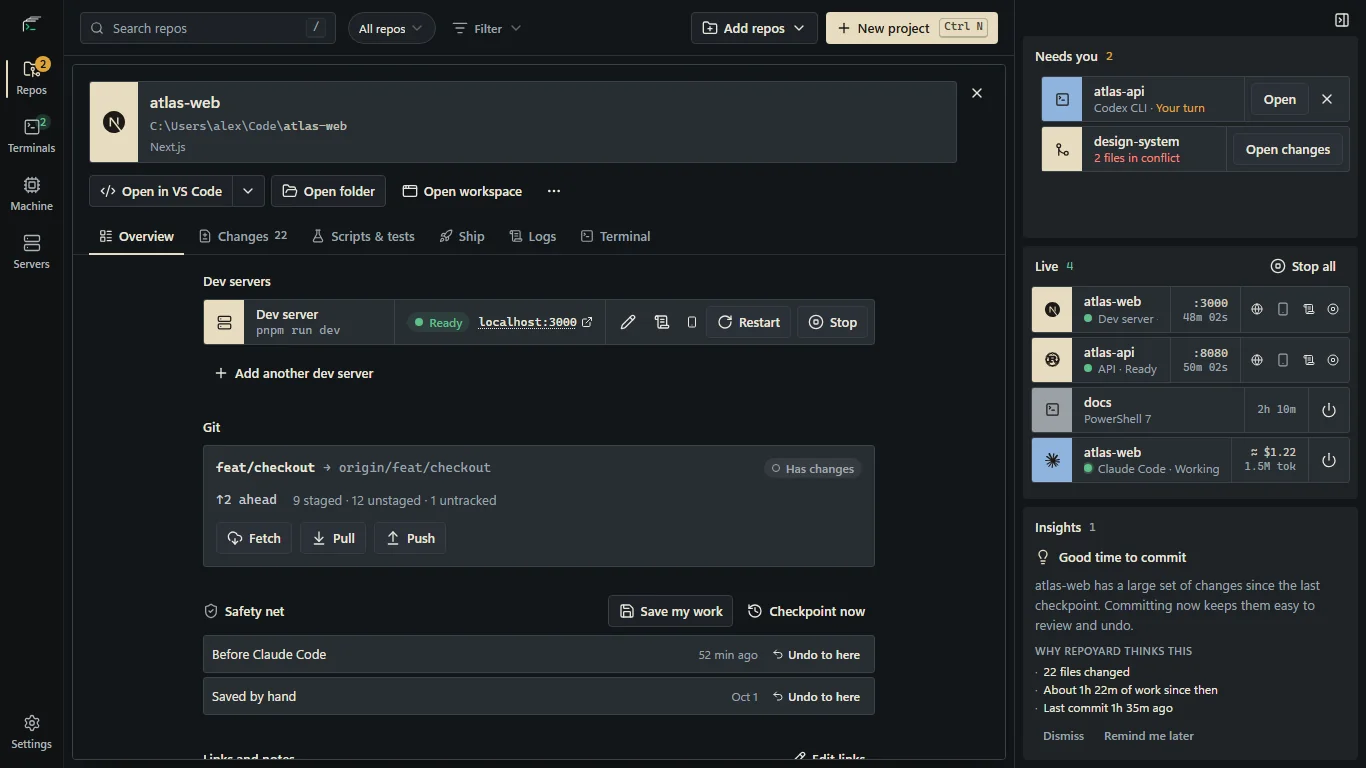
When you start a coding CLI in a repo through RepoYard, it checkpoints the working tree, including untracked files. In the repo's Overview, find Safety net and select Undo to here on the checkpoint from before that session.
RepoYard checkpoints the current state before restoring, so you have a point to return to if you change your mind. The restore preserves your branch, index and stash. Review Git status afterward, especially if you had staged changes before starting.
Know what the safety net covers
Checkpoints require a Git repo with at least one commit and exclude ignored files. RepoYard keeps the last 20 checkpoints. A session launched outside RepoYard does not get a checkpoint from that launch. If no suitable checkpoint exists, review your Git history and any backups rather than assuming an earlier state can be reconstructed.
Checkpoints are a local convenience, not a backup. They cannot reverse a database migration, an API call or a deployment. Keep your regular commits and backups, and review the selected checkpoint before restoring.
Try the workflow in RepoYard.
Windows 10 and 11, x64. Every feature for 7 days, then US$39.99 once. No RepoYard account needed.