Start an API and frontend together on Windows
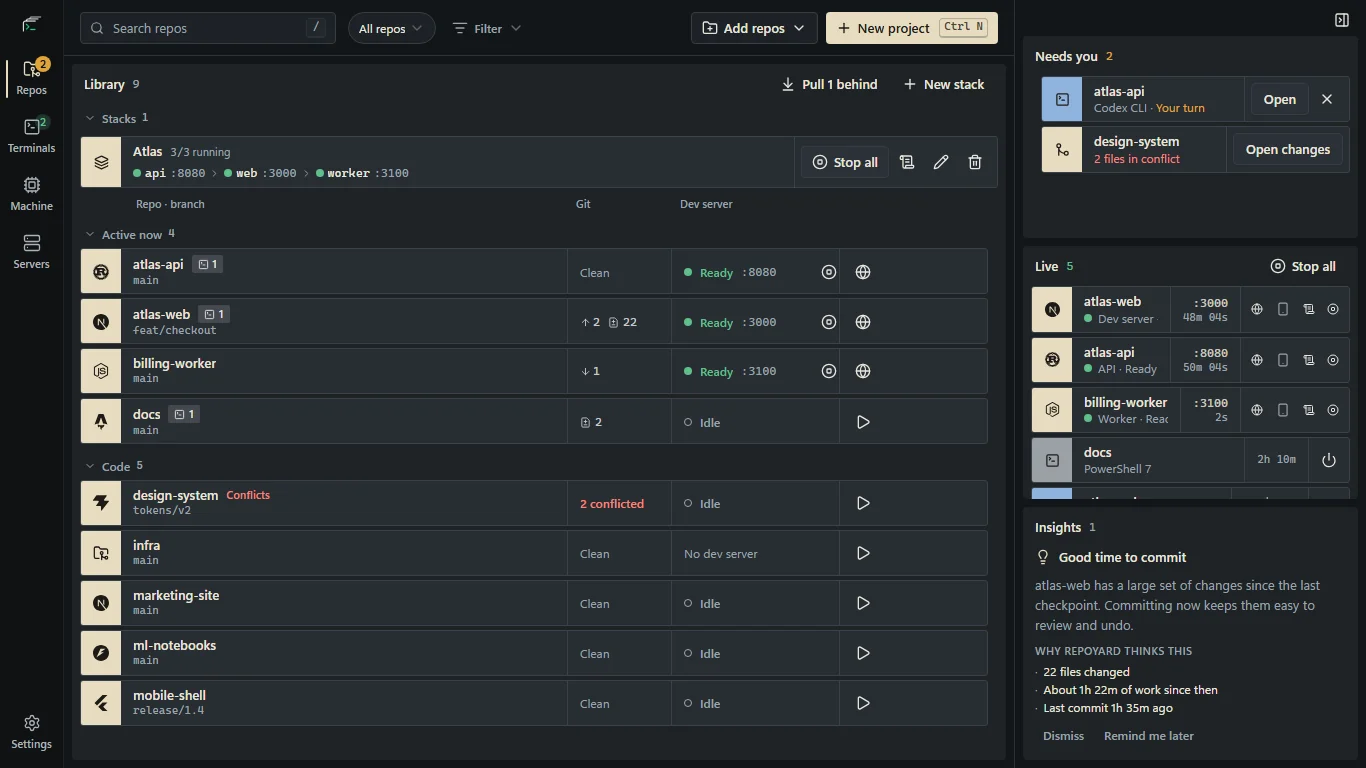
Starting an API and frontend in separate terminals works until the frontend starts too soon or the API moves to another port. A stack makes the startup order, readiness and shared ports explicit.
Start with commands that work on their own
Confirm that each service runs successfully from its own repo. Install its dependencies and check the command, working directory and environment variables. Grouping services will not fix a missing package or an invalid configuration.
Decide what must be ready first. An API might need to start before the web app, while a worker may depend on the API or another service. Use the actual dependencies of your project, rather than an arbitrary order.
Group services and define readiness
Put the repos into a stack in RepoYard and arrange the service startup order. Configure the readiness check for each service so the next one waits for a useful signal, rather than a fixed delay.
Start the stack and follow each service's logs. If one does not become ready, check its logs and readiness configuration before starting dependent services manually.
Pass the port instead of guessing it
RepoYard assigns available ports that other services can reference. A service named api exposes values such as {api.port} and {api.url}. Use those references in the appropriate dependent-service configuration so it receives the address for that run.
The application still needs to read the environment variable or argument you configure. Frameworks differ in how they expose API URLs, and a frontend may need to restart to pick up an environment change. One Stop all action stops the running stack.
Try the workflow in RepoYard.
Windows 10 and 11, x64. Every feature for 7 days, then US$39.99 once. No RepoYard account needed.