Create a .env file from .env.example on Windows
You clone a project, run npm run dev, and it stops on a missing variable such as DATABASE_URL. Projects keep keys and passwords in a .env file that Git ignores and commit .env.example instead, with the same keys and blank or sample values. Make your .env from it once, then keep it in step as the example changes.
Copy .env.example without overwriting your .env
The cp .env.example .env line in most READMEs works in PowerShell, where cp is another name for Copy-Item. In Command Prompt, type copy .env.example .env. Copy-Item replaces an existing .env without asking, so running the line again wipes the values you filled in. The first command below copies only when there is no .env yet.
In a monorepo, each app can have its own .env.example. The second command creates a .env beside each one Git tracks and leaves existing ones alone. Because it asks Git for the list, it skips node_modules. In our test with Windows PowerShell 5.1 and Git 2.52, it created the missing files and left an existing .env as it was.
# One project
if (Test-Path .env) { 'A .env is already there' } else { Copy-Item .env.example .env }

# Every .env.example in the repo, such as apps/web and apps/api
git ls-files '*.env.example' | ForEach-Object {
  $target = $_ -replace '\.example$', ''
  if (Test-Path $target) { "Already there: $target" }
  else { Copy-Item $_ $target; "Created $target" }
}
Keep .env out of Git
Check that Git ignores the file before you put real keys in it. git check-ignore -v .env prints the .gitignore rule that covers .env, and prints nothing when no rule does. If nothing prints, add a line with .env to .gitignore.
If git ls-files .env prints .env, the file was committed before, and the keys in it are in the repo's history. Change those keys at each service, then follow GitHub's guide to removing sensitive data.
If you made the file by hand, check its name too. File Explorer hides extensions it knows, so a file saved as .env.txt can show as .env, and your app won't read it. Get-ChildItem -Force .env* lists the real names.
git check-ignore -v .env
git ls-files .env
Get-ChildItem -Force .env*
Find the keys your .env is missing
This is the problem that keeps coming back. A teammate adds STRIPE_WEBHOOK_SECRET to .env.example, you pull, and the app starts but fails on the one page that needs it. This lists every key in .env.example that your .env doesn't have.
It compares names only, so a key written as API_KEY= with nothing after it counts as present. Next.js and Vite also read .env.local. If your project keeps keys there, set $have = Get-EnvKeys .env, .env.local instead.
function Get-EnvKeys($Path) {
  Get-Content $Path | ForEach-Object {
    if ($_ -match '^\s*(?:export\s+)?([A-Za-z_][\w.-]*)\s*=') { $Matches[1] }
  }
}
$have = Get-EnvKeys .env
Get-EnvKeys .env.example | Where-Object { $_ -notin $have }
Get a warning after git pull
Git runs a post-merge hook after a pull that merges or fast-forwards. This one looks at the .env.example files the pull changed and prints each key the .env beside it doesn't have, such as apps/web/.env has no STRIPE_WEBHOOK_SECRET from apps/web/.env.example. It also tells you when there is no .env yet. Run the command once in the repo's folder.
A pull with --rebase runs the post-rewrite hook instead, so the last line saves the same hook under that name. git commit --amend runs post-rewrite too, and the amend line keeps it quiet then. Hooks live in your own .git folder and are never pushed, so set this up in each clone. In our test, it caught new keys after merge, fast-forward and rebase pulls, and printed nothing once every key was there.
$hook = @'
#!/bin/sh
# After git pull: keys a changed .env.example has that the .env beside it lacks
[ "$1" = amend ] && exit 0
keys() { sed -n 's/^[[:space:]]*\(export[[:space:]]\{1,\}\)\{0,1\}\([A-Za-z_][A-Za-z0-9_.-]*\)[[:space:]]*=.*/\2/p' "$1"; }
git diff --name-only ORIG_HEAD HEAD -- '*.env.example' | while read -r example; do
  target="${example%.example}"
  if [ ! -f "$target" ]; then echo "No $target yet: copy it from $example"; continue; fi
  for key in $(keys "$example"); do
    keys "$target" | grep -qxF "$key" || echo "$target has no $key from $example"
  done
done
'@
Set-Content (git rev-parse --git-path hooks/post-merge) (($hook -replace "`r", '') + "`n") -NoNewline -Encoding Ascii
Copy-Item (git rev-parse --git-path hooks/post-merge) (git rev-parse --git-path hooks/post-rewrite)
Check every repo at once
If your repos sit in one folder, this goes through each one and prints a line for every .env that is missing or short of keys, such as atlas-web: .env is missing STRIPE_WEBHOOK_SECRET or infra: no .env yet. Repos with every key set print nothing. Set $code to your folder: it checks the repos directly inside it, using the Get-EnvKeys function from above.
# Uses Get-EnvKeys from the section above. $code is the folder that holds your repos.
$code = "$HOME\code"
Get-ChildItem $code -Directory | Where-Object { Test-Path "$($_.FullName)\.git" } | ForEach-Object {
  $repo = $_.Name
  Push-Location $_.FullName
  git ls-files '*.env.example' | ForEach-Object {
    $target = $_ -replace '\.example$', ''
    if (-not (Test-Path $target)) { "${repo}: no $target yet" }
    else {
      $have = Get-EnvKeys $target
      $missing = Get-EnvKeys $_ | Where-Object { $_ -notin $have }
      if ($missing) { "${repo}: $target is missing $($missing -join ', ')" }
    }
  }
  Pop-Location
}
See missing keys in RepoYard
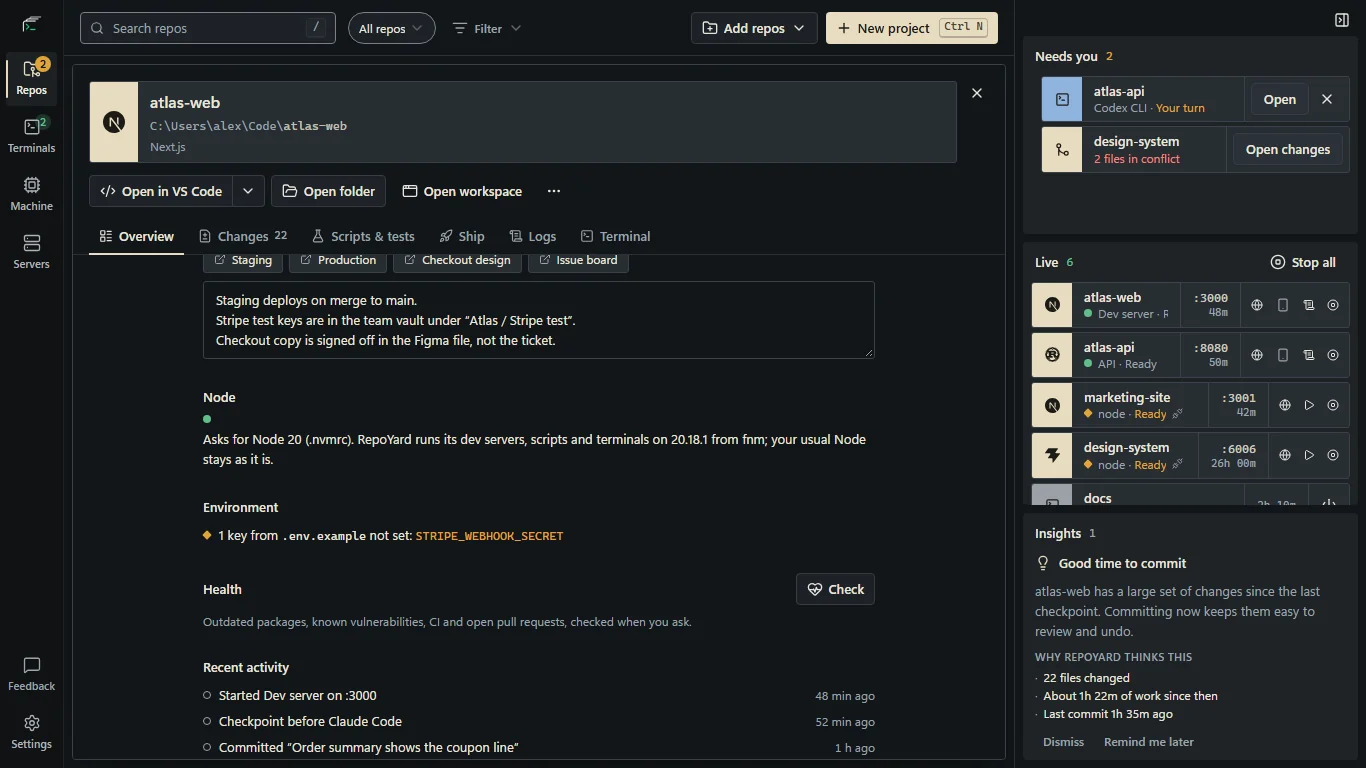
The scripts help when you remember to run them. RepoYard shows the result when you open a repo: look at Environment on its Overview tab. For each .env.example, .env.sample or .env.template in the repo, including ones in package folders such as apps/web, it shows one line: every key is set, the keys that no env file in that folder sets, or No .env yet with a Create .env from it button.
Create .env from it copies the example to a .env beside it for you to fill in, and never replaces a .env that is already there. On the board, a repo with a dev server and no .env gets a No .env yet card under Needs you, with the same button.
RepoYard shows key names, never values. It counts a key as set when .env, .env.local or another env file in the same folder has it, even with an empty value, and looks up to four folders deep, skipping node_modules, build output and similar folders.
Further reading
Try the workflow in RepoYard.
Windows 10 and 11, x64. Every feature for 7 days, then US$39.99 once. No RepoYard account needed.